A working raspberry pi voice chat bot version 1
First version of a working and offline voice bot
This post walks through the full system I built:
- Architecture
- Libraries and tools
- How each service works
- The Ramayana RAG pipeline
- Key C# snippets that glue everything together
1. What this bot actually does
As of today, my Kid Voice Bot can:
- Record audio from a USB mic for a few seconds
- Transcribe it to text with Whisper
- Optionally pull context from a Ramayana PDF using a custom RAG index
- Ask Ollama (Llama 3.2 1B) for a short kid friendly answer
- Speak the answer using Piper TTS
- Play the audio out of speakers
The whole thing is wrapped in a simple console UX:
- Hit ENTER to record
- Bot answers in voice
- Type
/quitto exit
All core behaviour is config driven from appsettings.json
2. Architecture
| Layer | Technology | Why |
|---|---|---|
| STT | Whisper (whisper.cpp via Whisper.Net) | Fast, accurate, runs on Pi 5 |
| LLM | Ollama (Llama 3.2 1B) | Tight latency + high control |
| TTS | Piper | Natural child-friendly voice, ultra fast |
| RAG | Embedding + cosine similarity + Ramayana PDF | Cultural grounding |
| Audio | arecord + aplay | Works well with ALSA on Raspberry Pi |
| Language | C# .NET 8 | Strong typing + easy modularization |
Logical Components
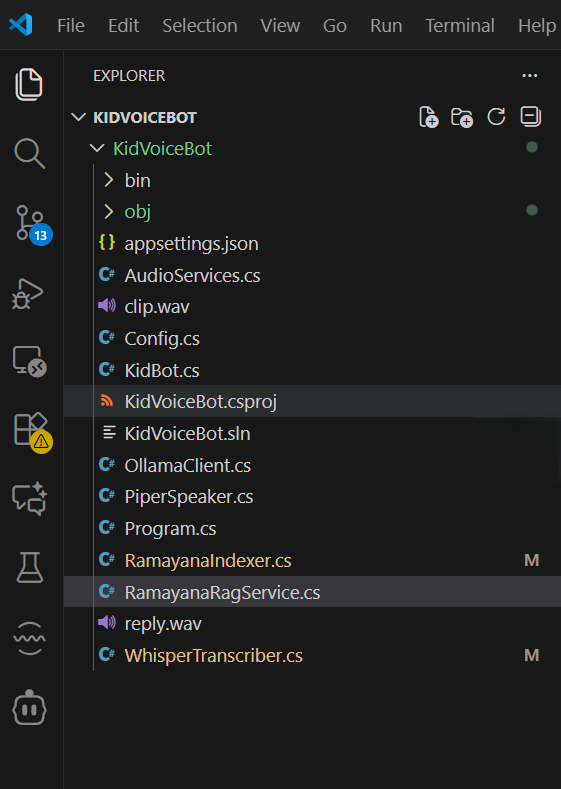
Audio layer
- AudioRecorder for recording
- AudioPlayer for playback
Model layer
- WhisperTranscriber for speech to text
- OllamaClient for LLM calls
- PiperSpeaker for text to speech
RAG layer
- RamayanaIndexer to build a JSON index from a Ramayana PDF
- RamayanaRagService to fetch relevant chunks at runtime
Orchestration layer
- KidBot - the main loop that ties everything together
- Program - entry point and mode switch (index vs run)
Configuration
- appsettings.json and Config classes
3. Configuration-Driven System
Everything works off a single appsettings.json file. This makes testing/tuning easy.
1
2
3
4
5
6
7
8
9
10
11
12
13
14
15
16
17
18
19
20
21
22
23
24
25
26
27
28
29
{
  "Audio": {
    "SampleRate": 16000,
    "Channels": 1,
    "SecondsPerClip": 4
  },
  "Models": {
    "WhisperPath": "/home/admin/models/whisper/ggml-base.en-q5_1.bin",
    "PiperVoicePath": "/home/admin/models/piper/en_US-amy-medium.onnx",
    "PiperExe": "/home/admin/.piper-venv/bin/piper"
  },
  "Ollama": {
    "BaseUrl": "http://localhost:11434",
    "Model": "llama3.2:1b",
    "SystemPrompt": "You are a friendly, kid-safe assistant. Use very simple words, 2-3 short sentences."
  },
  "Rag": {
    "Enabled": true,
    "QdrantEndpoint": "http://localhost:6333",
    "CollectionName": "ramayana",
    "EmbeddingModel": "nomic-embed-text",
    "TopK": 3
  },
  "Ramayana": {
    "PdfPath": "/home/admin/data/ramayana.pdf",
    "ChunkCharacters": 900,
    "IndexPath": "/home/admin/data/ramayana_index.json"
  }
}
4. Audio Layer (Recording + Playback)
On the Pi I decided to keep it simple and lean on ALSA using lightweight process wrappers inside the AudioServices.cs class. ALSA is the lowest level of the Linux sound stack, and can be access through the CLI.
Recording (AudioRecorder)
1
2
3
4
5
6
7
8
9
10
11
12
13
14
15
16
17
18
19
20
21
22
23
24
public static async Task<string> RecordWavAsync(string path, AudioConfig cfg)
{
    var args = $"-f S16_LE -r {cfg.SampleRate} -c {cfg.Channels} " +
               $"-d {cfg.SecondsPerClip} -t wav -q \"{path}\"";

    var psi = new ProcessStartInfo("arecord", args)
    {
        RedirectStandardError = true,
        RedirectStandardOutput = true
    };

    using var p = Process.Start(psi);
    if (p == null)
        throw new InvalidOperationException("Failed to start 'arecord'.");

    await p.WaitForExitAsync();
    if (p.ExitCode != 0)
    {
        var err = await p.StandardError.ReadToEndAsync();
        throw new InvalidOperationException($"arecord failed: {err}");
    }

    return path;
}
Playback (AudioPlayer)
1
2
3
4
5
6
7
8
9
10
11
12
13
14
15
16
17
18
19
20
21
22
public static async Task PlayWavAsync(string wavPath)
{
    var psi = new ProcessStartInfo("aplay", $"\"{wavPath}\"")
    {
        RedirectStandardError = true,
        RedirectStandardOutput = true
    };

    using var p = Process.Start(psi);
    if (p == null)
    {
        Console.WriteLine("Could not start 'aplay'.");
        return;
    }

    await p.WaitForExitAsync();
    if (p.ExitCode != 0)
    {
        var err = await p.StandardError.ReadToEndAsync();
        Console.WriteLine($"aplay error: {err}");
    }
}
5. Whisper STT Integration
For STT, I used Whisper.Net, which wraps whisper.cpp nicely for C#. I load the GGML model from the config path.
1
2
3
4
5
6
7
8
9
10
public WhisperTranscriber(string modelPath)
{
    if (string.IsNullOrWhiteSpace(modelPath))
        throw new ArgumentException("Whisper model path is not configured.", nameof(modelPath));

    _factory = WhisperFactory.FromPath(modelPath);
    _processor = _factory.CreateBuilder()
        .WithLanguage("en")
        .Build();
}
running the actual transcription below, which gives me plain text from the child’s speech. I keep it raw and simple and handle grammar problems at the LLM layer.
1
2
3
4
5
6
7
8
9
10
11
12
13
14
15
public async Task<string> TranscribeAsync(string wavPath)
{
    if (!File.Exists(wavPath))
        throw new FileNotFoundException("Audio file not found", wavPath);

    var sb = new StringBuilder();

    await using var fs = File.OpenRead(wavPath);
    await foreach (var segment in _processor.ProcessAsync(fs))
    {
        sb.Append(segment.Text);
    }

    return sb.ToString().Trim();
}
6. Piper TTS- speaking back to the child
Piper is called as an external process as well. Again, small wrapper, clear contract.
1
2
3
4
5
6
7
8
9
10
11
public PiperSpeaker(ModelsConfig models)
{
    _exe = string.IsNullOrWhiteSpace(models.PiperExe)
        ? "/usr/bin/piper"
        : models.PiperExe;

    _modelPath = models.PiperVoicePath;

    if (string.IsNullOrWhiteSpace(_modelPath))
        throw new ArgumentException("Piper voice model path is not configured.", nameof(models.PiperVoicePath));
}
The actual speech:
1
2
3
4
5
6
7
8
9
10
11
12
13
14
15
16
17
18
19
20
21
22
23
24
25
26
27
28
29
30
31
32
33
34
35
36
37
38
39
40
41
42
public async Task SpeakAsync(string text, string wavOutPath)
{
    if (string.IsNullOrWhiteSpace(text))
    {
        Console.WriteLine("[TTS] Empty text. Skipping Piper.");
        return;
    }

    var psi = new ProcessStartInfo(_exe)
    {
        RedirectStandardInput = true,
        RedirectStandardOutput = true,
        RedirectStandardError = true,
        UseShellExecute = false
    };

    psi.ArgumentList.Add("-m");
    psi.ArgumentList.Add(_modelPath);
    psi.ArgumentList.Add("-f");
    psi.ArgumentList.Add(wavOutPath);

    using var proc = Process.Start(psi);
    if (proc == null)
        throw new InvalidOperationException("Failed to start Piper.");

    await proc.StandardInput.WriteLineAsync(text);
    await proc.StandardInput.FlushAsync();
    proc.StandardInput.Close();

    var stderrTask = proc.StandardError.ReadToEndAsync();
    var stdoutTask = proc.StandardOutput.ReadToEndAsync();

    await proc.WaitForExitAsync();
    var stderr = await stderrTask;
    var stdout = await stdoutTask;

    if (proc.ExitCode != 0)
    {
        throw new InvalidOperationException(
            $"Piper exited with code {proc.ExitCode}.\nSTDERR:\n{stderr}\nSTDOUT:\n{stdout}");
    }
}
7. Ollama LLM Client + Prompting Strategy
Prompt constructed dynamically with system prompt + RAG context + child’s query.
1
2
3
4
5
6
7
8
9
10
11
12
13
14
15
16
17
18
19
20
21
22
23
24
25
26
27
28
29
30
31
32
33
34
35
36
37
38
39
40
41
42
43
44
45
46
public async Task<string> GenerateReplyAsync(
    string userText,
    string? context = null,
    CancellationToken ct = default)
{
    var sb = new StringBuilder();
    sb.AppendLine(_cfg.SystemPrompt);
    sb.AppendLine();

    if (!string.IsNullOrWhiteSpace(context))
    {
        sb.AppendLine("Here are some passages from the Ramayana. Use them to answer:");
        sb.AppendLine(context);
        sb.AppendLine();
    }

    sb.AppendLine($"Child said: \"{userText}\"");
    sb.AppendLine();
    sb.AppendLine("Answer in 3-4 simple sentences for a child.");

    var reqObj = new
    {
        model = _cfg.Model,
        prompt = sb.ToString(),
        stream = false,
        keep_alive = 300
    };

    var json = JsonSerializer.Serialize(reqObj);
    using var content = new StringContent(json, Encoding.UTF8, "application/json");
    var url = $"{_cfg.BaseUrl.TrimEnd('/')}/api/generate";

    HttpResponseMessage resp;
    try
    {
        resp = await Http.PostAsync(url, content, ct);
    }
    catch (Exception ex)
    {
        Console.WriteLine($"[LLM] HTTP error: {ex.Message}");
        return string.Empty;
    }

    var body = await resp.Content.ReadAsStringAsync(ct);
    ...
}
8. Ramayana RAG
I wanted my child to hear stories and answers rooted in the Ramayana (retelling by C Rajagopalachari), not random internet style text. So I implemented a custom RAG pipeline in 2 parts:
- Indexer that runs once and creates a JSON index from the Ramayana PDF
- Runtime service that looks up relevant chunks per question
1
2
3
4
5
6
7
8
9
10
using var doc = PdfDocument.Open(pdfPath);
foreach (Page page in doc.GetPages()) { ... }

//Chunking
if (sb.Length >= chunkChars)
    chunks.Add(new TextChunk { Text = sb.ToString().Trim(), ... });

//Embedding via Ollama:
var req = new { model = cfg.Rag.EmbeddingModel, input = text };
var resp = await Http.PostAsync(url, content, ct);
Full index persisted as JSON to the disk. At runtime, RamayanaRagService loads the JSON index and handles all similarity search.
9. KidBot Orchestration Layer
This is the glue that ties everything together.
- Wait for ENTER
- Record audio
- Transcribe
- Run RAG
- Generate LLM reply
- Speak via Piper
- Playback
- Repeat
1
2
3
4
5
6
clipPath = await AudioRecorder.RecordWavAsync("clip.wav", _config.Audio);
text = await _stt.TranscribeAsync(clipPath);
context = await _rag.TryGetContextAsync(text);
reply = await _llm.GenerateReplyAsync(text, context);
await _tts.SpeakAsync(reply, "reply.wav");
await AudioPlayer.PlayWavAsync("reply.wav");
10. Entry point and modes
The Program class sets up dependency wiring and supports two modes out of the box:
- index - build or rebuild the Ramayana index
- default - run the interactive voice bot
1
2
3
4
5
6
7
8
9
10
11
12
13
14
15
16
17
18
19
20
21
22
23
24
25
26
27
28
29
30
31
static async Task Main(string[] args)
{
    var configurationRoot = new ConfigurationBuilder()
        .SetBasePath(Directory.GetCurrentDirectory())
        .AddJsonFile("appsettings.json", optional: false)
        .Build();

    var config = configurationRoot.Get<Config>()
                 ?? throw new InvalidOperationException("Failed to bind appsettings.json to Config.");

    // Index mode
    if (args.Length > 0 && args[0].Equals("index", StringComparison.OrdinalIgnoreCase))
    {
        Console.WriteLine("Running Ramayana indexer...");
        await RamayanaIndexer.BuildIndexAsync(config);
        return;
    }

    Console.WriteLine("Starting Whisper (STT)...");
    await using var whisper = new WhisperTranscriber(config.Models.WhisperPath);

    Console.WriteLine("Starting Ollama client...");
    using var llm = new OllamaClient(config.Ollama);

    Console.WriteLine("Starting Piper (TTS)...");
    var tts = new PiperSpeaker(config.Models);

    var rag = new RamayanaRagService(config);
    var bot = new KidBot(config, whisper, llm, tts, rag);
    await bot.RunAsync();
}
11. What’s Next (Roadmap)
Audio layer
- Add VAD (voice activity detection) to stop recording once silence is detected. This directly reduces Whisper processing time.
- Instead of writing audio to disk and reading again, capture into memory
- Add wake word (“Hey Rama”)
- Keep Piper process warm- reduce per process startup cost
Embeddings
- Better quality chunking: Right now it’s fixed character chunking. Upgrade to semantic chunking with overlap using Qdrant
LLM
- Limit tokens generated (num_predict)
- Shorter system prompt + context: Keep system prompt extremely tight and trim from topk from 5 to 2.
- Ollama is loading/unloading the model each time: Add “keep_alive”: 300 to ensure the model is kept warm between queries.
Product Experience
- Session memory per conversation
- Safer guardrails using LlamaGuard
- Add more RAG content- mahabharata, story teller, math, nature, space, etc
- Add Agentic RAG layer using Microsoft Semantic Kernel, so requests are directly matched with the right collections in Qdrant
- Graceful degradation- if RAG context is null, have a fallback answer